
- ◆ChatGPT now lets a business owner claim their listing at chatgpt.com/business-hub, much like claiming a Google Business Profile.
- ◆The flow: search your business, pick the listing with your address (or create one), click Get started, then Continue, then verify.
- ◆You verify with a code to your business phone (text or call) or by adding a DNS TXT record to your website's domain.
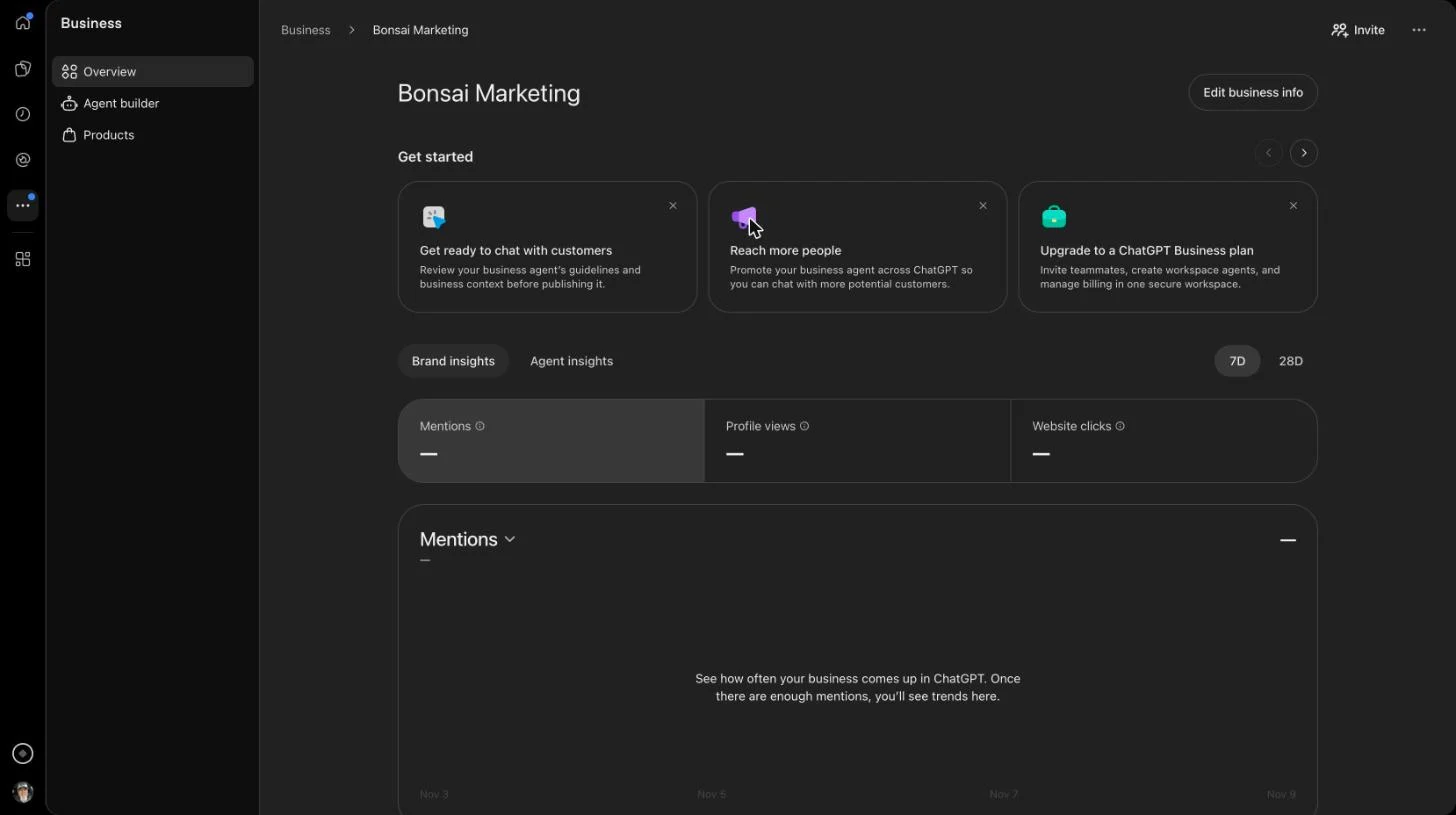
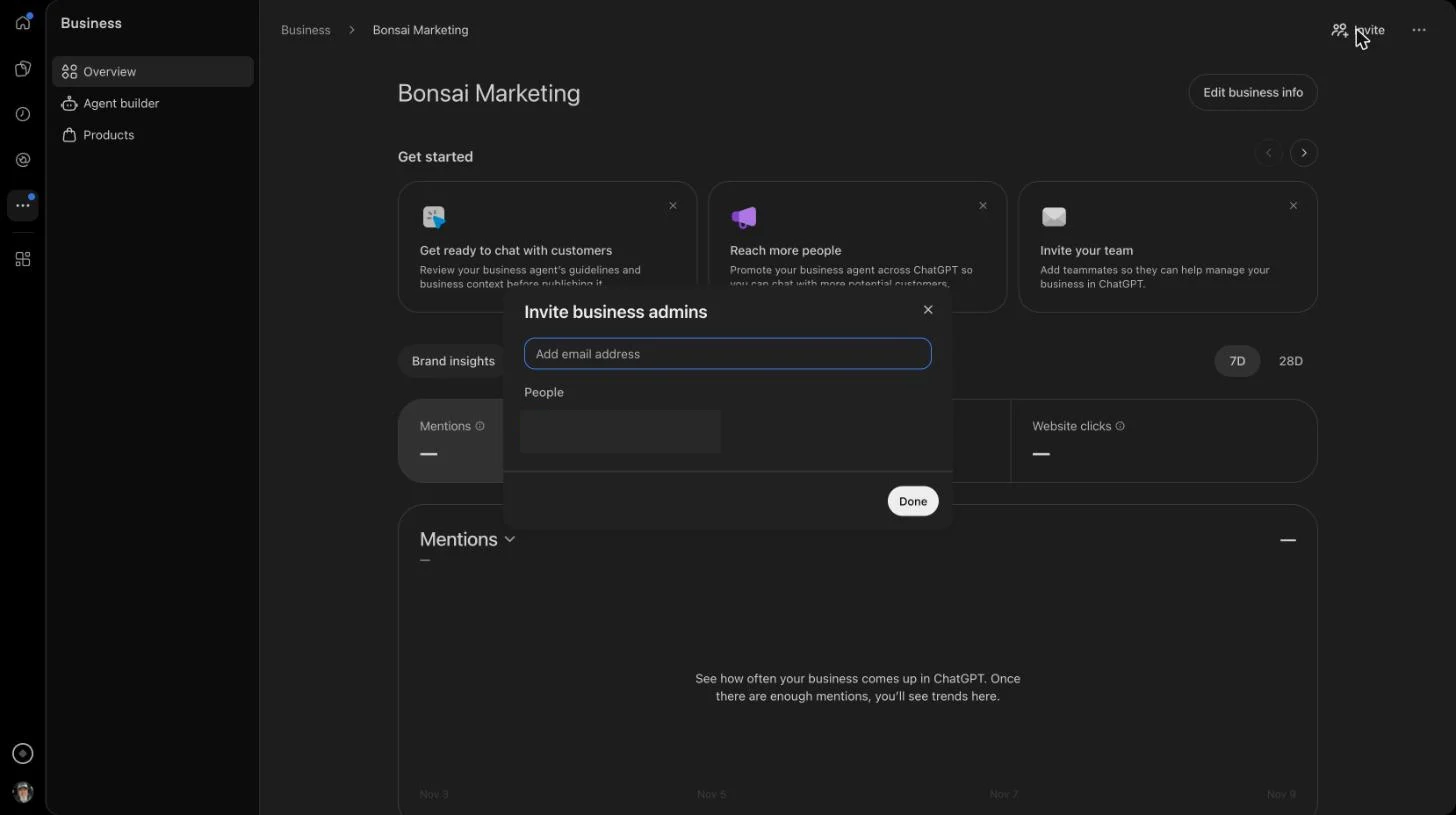
- ◆Once verified you get a business dashboard: mentions, profile views and website clicks, plus Products, an Agent builder and Edit business info.
- ◆The Invite button adds business admins by email, so your marketing team can keep the listing accurate.
- ◆Stuck? Call or text Bryan directly at 707-548-7812.
Quick question: who is telling ChatGPT about your business right now? Odds are it isn't you. ChatGPT pieces together what it says about you from whatever it can find, and until now you had no seat at that table.
That changed. ChatGPT now lets business owners claim their listing, the same way you claim a Google Business Profile. I did it for Bonsai Marketing, took screenshots of every screen, and wrote up the steps below. If you only have a minute, watch the video above. If you want every click, keep reading.
Why claiming your business on ChatGPT matters
I've been in search for 27 years. Every time a new place shows up where customers look for a business, the owners who claim it early get the cleanest listing and the most control. Google Maps was like that. This is like that.
Here's what OpenAI says a claimed listing gives you, straight from the claim screen:
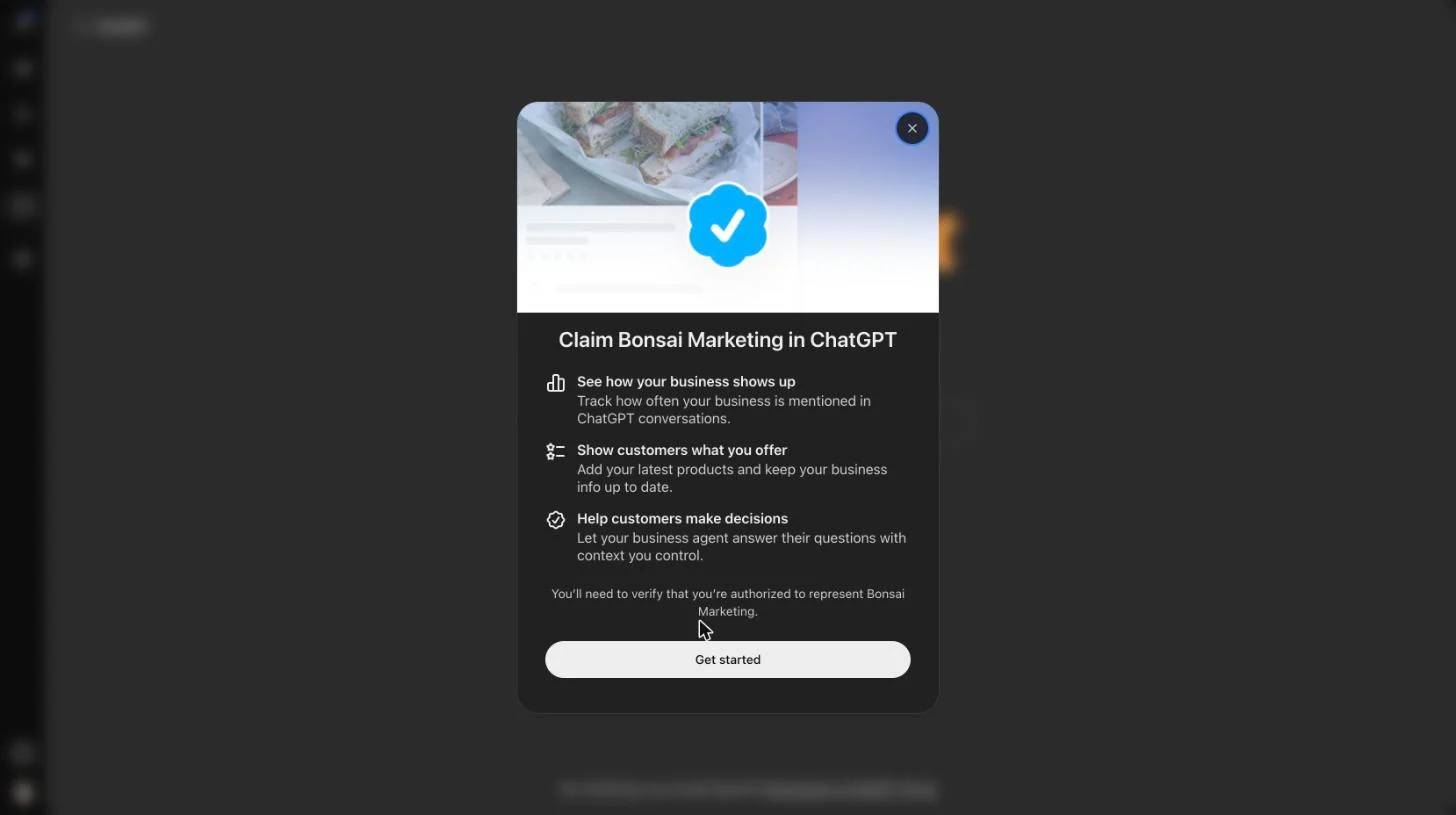
- See how your business shows up. Track how often your business is mentioned in ChatGPT conversations.
- Show customers what you offer. Add your latest products and keep your business info up to date.
- Help customers make decisions. Let your business agent answer their questions with context you control.
If you don't claim it, you're leaving that story to whatever ChatGPT can find on its own.
What you need before you start
- A ChatGPT account. A free one worked for us.
- Either the business phone number on your listing (you'll get a code by text or call), or access to your website's DNS settings.
- Your business name, exactly as customers know it.
How to claim your business on ChatGPT, step by step
Step 1. Open the ChatGPT business hub
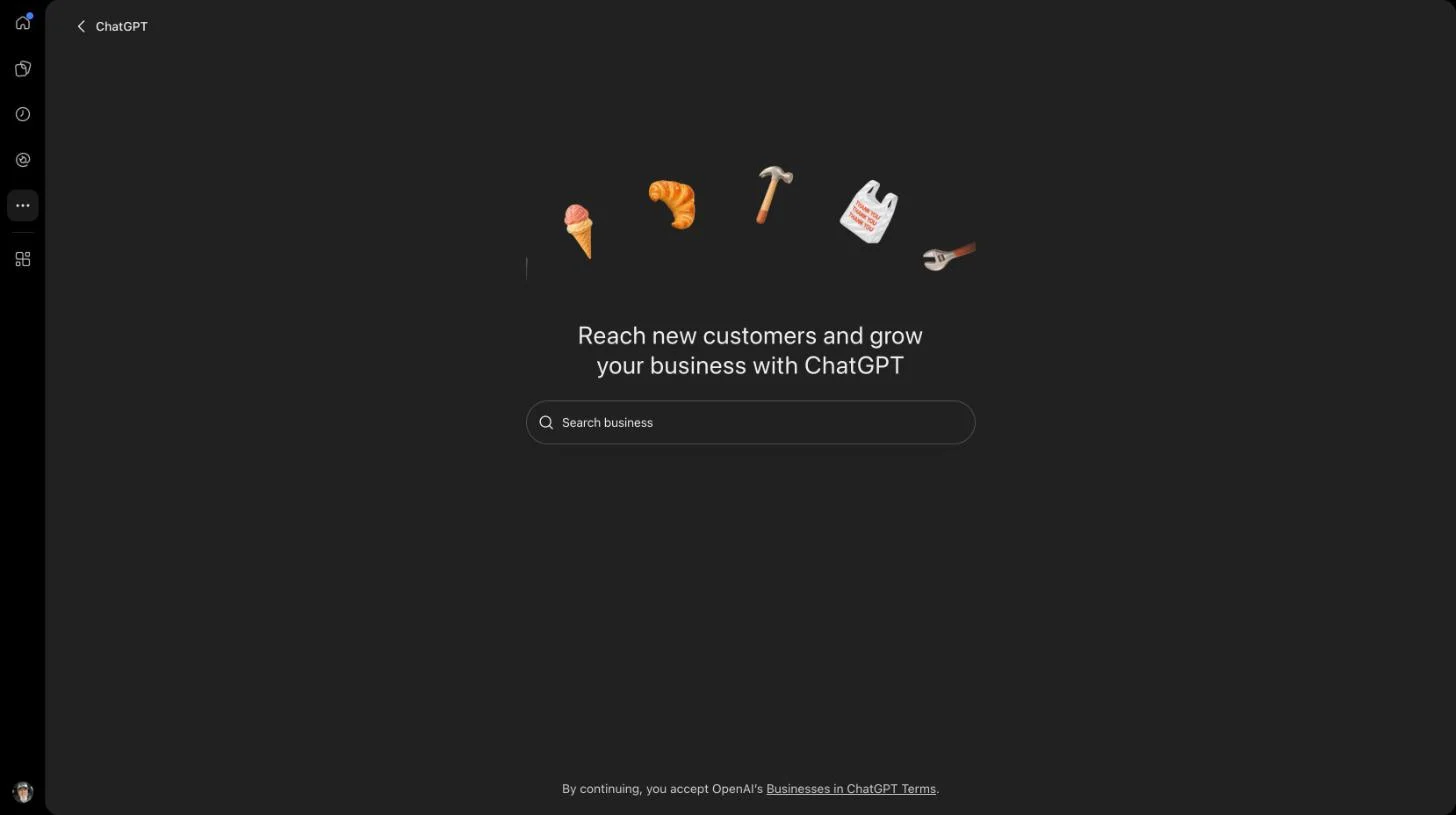
Go to chatgpt.com/business-hub and sign in. You'll land on a page that says "Reach new customers and grow your business with ChatGPT" with a Search business box in the middle.
Step 2. Search for your business and pick your listing
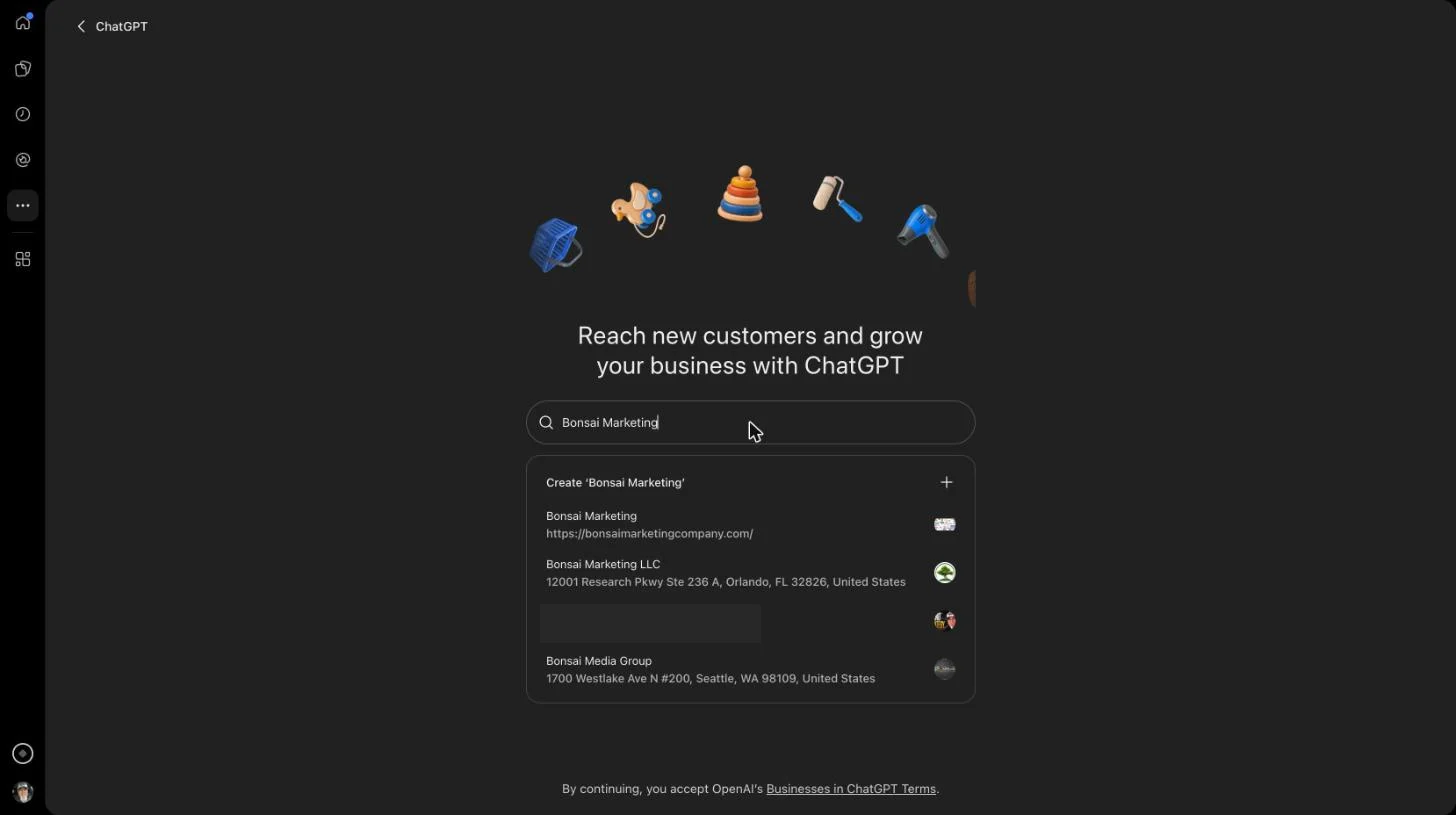
Type your business name. You'll see a list of matches with their addresses or websites. Pick the one that's actually you. Check the address. Similar names are common (we got three other Bonsais). If you're not in the list, the top option is Create with your name. Use that.
Step 3. Click Get started
A window opens titled Claim (your business) in ChatGPT. It lists the three benefits above and tells you you'll need to verify you're authorized to represent the business. Click Get started.
Step 4. Confirm your account and click Continue
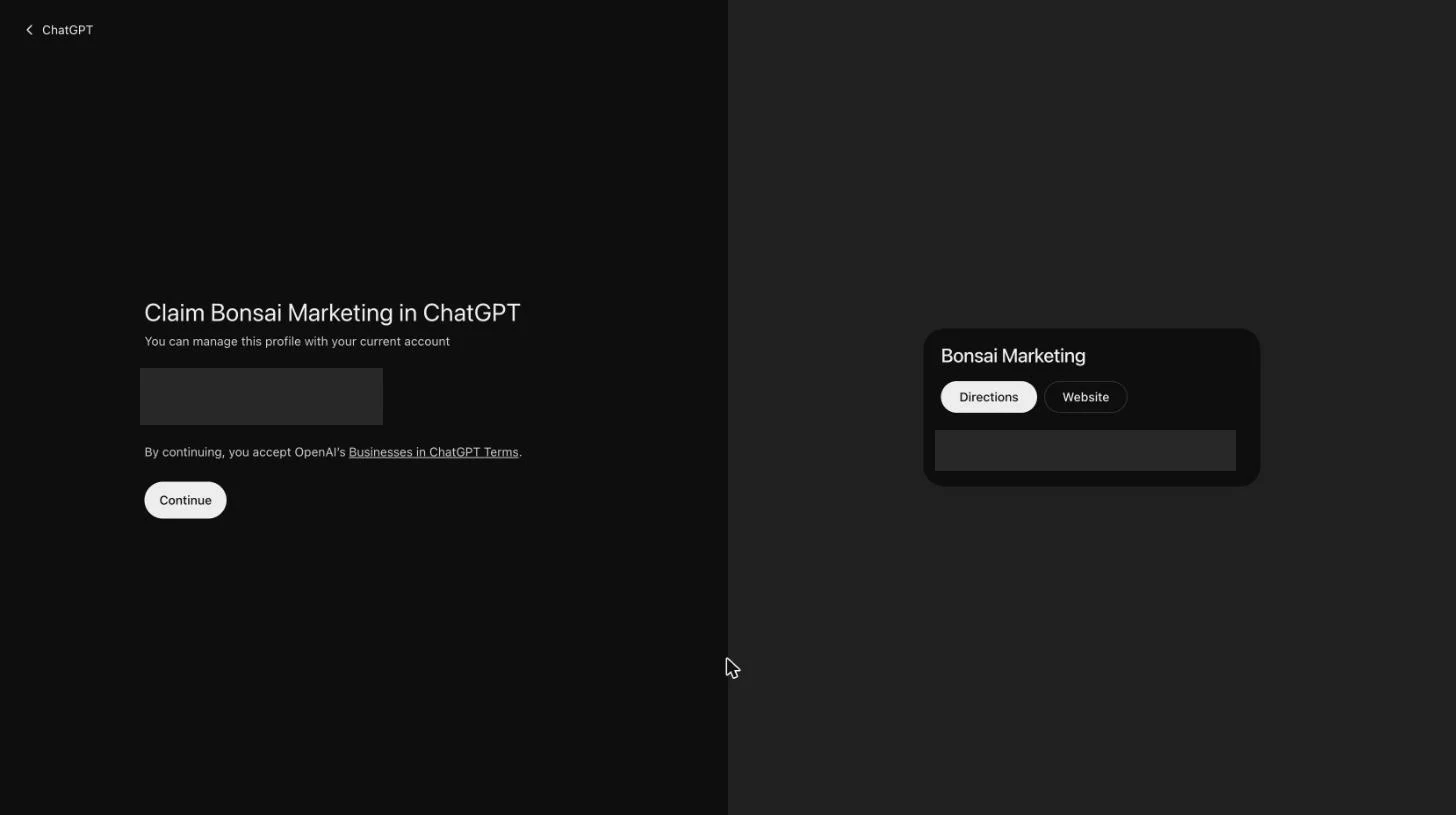
ChatGPT shows the account you're signed in with. That account will manage the profile, so make sure it's the right one. A business owner should use an account they control, not an employee's personal login. Clicking Continue accepts OpenAI's Businesses in ChatGPT Terms.
Step 5. Choose how to verify your claim
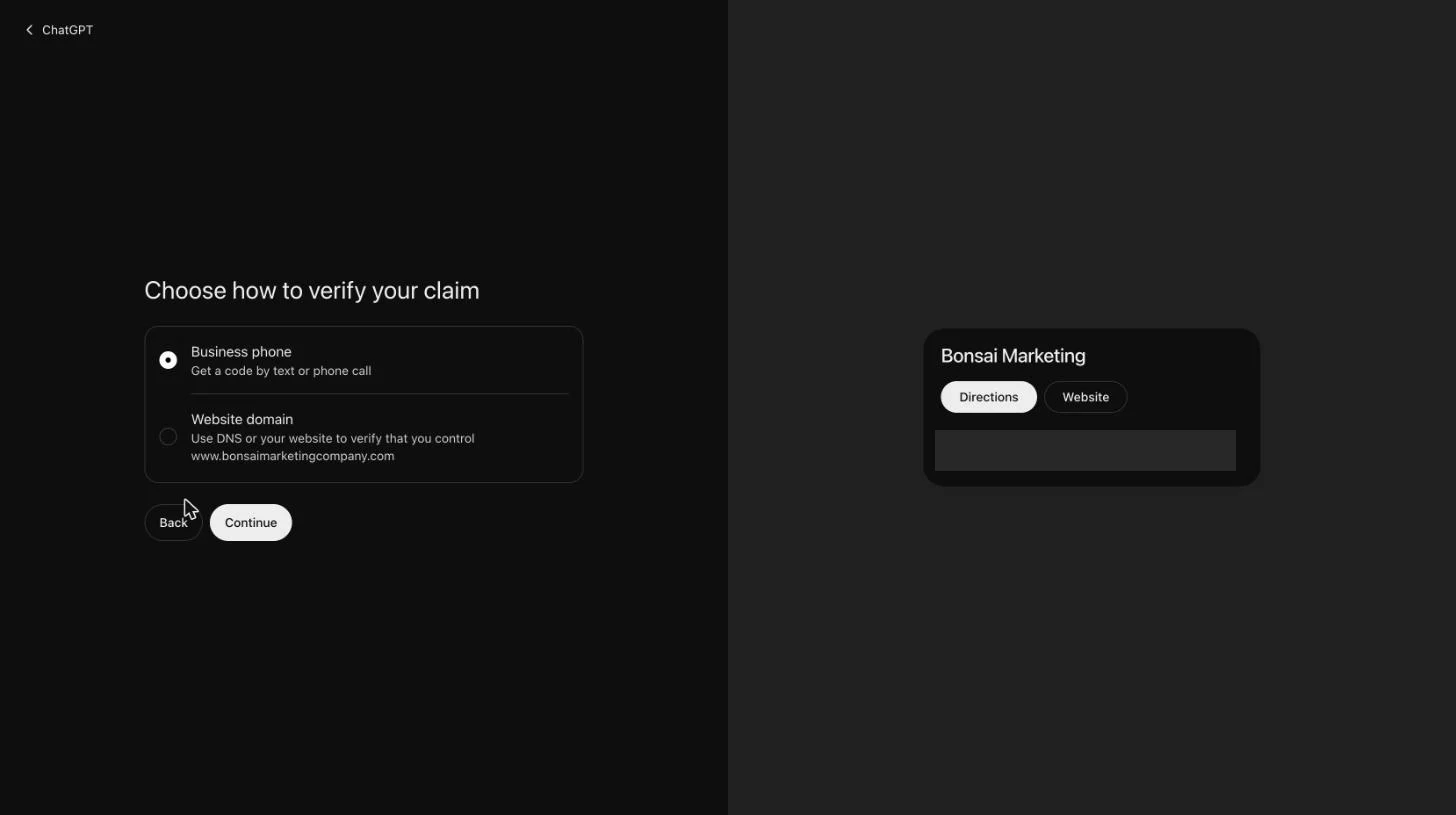
You get two options:
- Business phone. Get a code by text or phone call.
- Website domain. Use DNS to prove you control your website's domain.
Pick one and click Continue. More on choosing below.
Step 6. Finish verification
Phone: punch in the code they send you. Done.
Website domain: ChatGPT gives you a TXT record to add wherever your DNS is managed (your registrar, Cloudflare, your host). It looks like this:
- Type: TXT
- Host / name:
openai-business-claim.yourdomain.com - Value:
openai-business-claim=followed by the token ChatGPT shows you
The record expires about 24 hours after it's issued, so add it the same day. Then go back and confirm.
Step 7. Check your business dashboard
Once you're verified, you land on your business dashboard. Under Brand insights you'll see Mentions, Profile views and Website clicks, over 7 or 28 days. There's also Agent insights, an Agent builder, a Products section, and an Edit business info button. Start with Edit business info and make sure your hours, phone and website match everywhere else. Expect the charts to be empty at first; ChatGPT says trends show up once there are enough mentions.
Step 8. Invite your marketing team
Click Invite in the top right. A box called Invite business admins opens. Add your team's or your agency's email addresses and click Done. This is the step most owners will skip, and it's the one that keeps your info sharp, because the people who update your website and Google profile can now update this too.
Phone vs. website domain verification
Phone is faster. Use it if the number on your listing rings a phone you can pick up today.
Use website domain if:
- The listing has an old number, a tracking number, or a call center line.
- The number forwards somewhere you can't get a text.
- You have someone (you, your web person, your agency) who can add a DNS record.
Common problems and fixes
My business isn't in the search results. Choose Create at the top of the results. Try a shorter version of your name first, in case the listing exists under slightly different wording.
There are several listings that look like mine. Go by the address and website, not the name. If two are really you, claim the one with the correct address and website.
The verification code goes to an old number. Don't fight it. Go back and pick Website domain instead.
The DNS record isn't being picked up. DNS changes can take time to show up. Double-check the host name (some DNS panels add your domain automatically, so you only type openai-business-claim), make sure the value is pasted exactly, and remember the record expires about 24 hours after it was issued. If it lapses, start the domain verification again to get a new one.
I claimed it with the wrong account. Use Invite to add the right people as admins.
Do it this week
Not next quarter. This week. It's one of the few things in marketing that costs you nothing but a few minutes, and it gives you a say in how ChatGPT presents your business.
If you get stuck, call or text me directly at 707-548-7812. Yes, that's my actual cell. That's how big I think this is.
Bryan Fikes, Bonsai Marketing
Frequently asked questions
Is it free to claim your business on ChatGPT?
We claimed our own business with a free ChatGPT account and nothing in the flow asked us to pay. The dashboard does show an optional card about upgrading to a ChatGPT Business plan, but claiming and verifying did not require it. OpenAI's Businesses in ChatGPT Terms, linked on the hub page, are the place to check for anything that changes.
How long does it take to claim a business on ChatGPT?
With phone verification it is a few minutes if the code reaches a phone you can answer. Website domain verification takes longer, because you have to add a DNS TXT record and wait for it to show up. The record expires about 24 hours after ChatGPT issues it, so add it the same day.
What if my business isn't listed in ChatGPT?
When you search on chatgpt.com/business-hub, the first option in the results is Create followed by the name you typed. Choose that to create the listing, then verify it the same way as an existing one.
Should I verify by business phone or by website domain?
Use Business phone if the number on your listing is one you can answer today, since the code comes by text or phone call. If that number is old, belongs to a call center or forwards somewhere you can't reach, use Website domain and add the DNS TXT record instead.
Can my marketing agency manage my ChatGPT business listing?
Yes. Once you have verified, click Invite on the business dashboard and add your agency's email addresses as business admins. You stay the owner who claimed it, and your team can help keep the information current.
What does claiming my business on ChatGPT actually change?
OpenAI lists three things: you can see how your business shows up (how often it is mentioned in ChatGPT conversations), show customers what you offer (add products and keep your business info up to date), and help customers make decisions (a business agent answers their questions with context you control). We have not seen published data on ranking or recommendation effects, so we are not claiming any.
Do I need a ChatGPT account to claim my business?
Yes. You sign in to ChatGPT, and the account you are signed in with is the one that will manage the profile. A free account worked for us.
Is ChatGPT's business listing connected to my Google Business Profile?
We don't know of any connection, and OpenAI does not describe one in the claim flow. Treat them as two separate listings and keep your name, address, phone number and website identical on both.